CertScope

Watch TLS certificates and catch them before they expire.
  • Windows 10/11 (x64)
  • v1.0.0
  • 60.4 MB
  • Released 18 Oct 2026
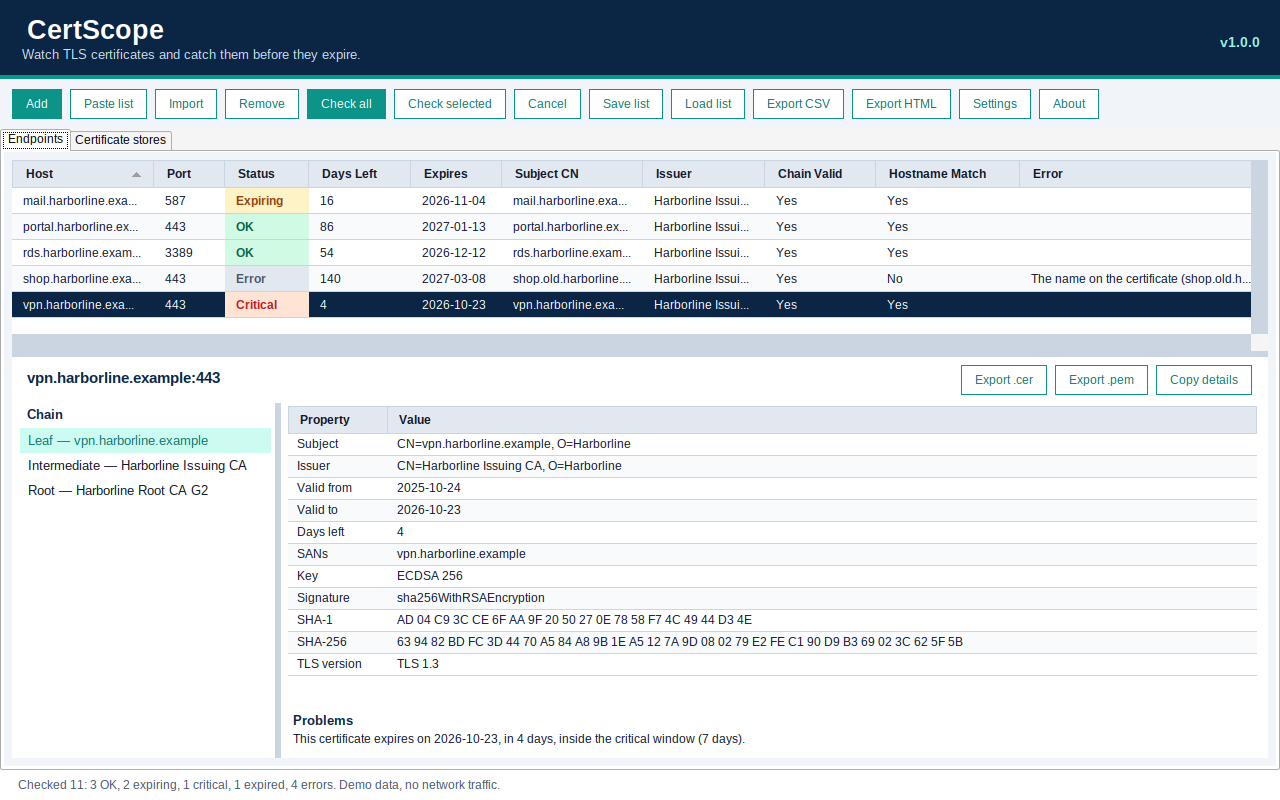
CertScope 1.0.0 Endpoints tab: a grid of hosts with port, status (OK, Expiring, Critical, Error), days left, expiry date, subject, issuer, chain valid and hostname match, and below it the selected certificate chain, its properties and a Problems note.
Real screenshot of CertScope 1.0.0 in demo mode, checking fictional harborline.example endpoints (no network traffic was sent). It was captured running under Wine, so the fonts look a little different from Windows.

About CertScope

CertScope watches TLS certificates so they don’t catch you out. Give it a list of hosts, host:port pairs or URLs, and it checks them all in parallel: days left, chain validity, hostname match, issuer, key, signature and TLS version, with a clear OK, Expiring, Critical, Expired or Error status for each.

It covers more than websites: LDAPS, IMAPS, POP3S and other TLS ports, STARTTLS for SMTP, IMAP and POP3, and RDP. When something is wrong, the Problems section explains it in plain language, and you can see the full chain and export any certificate as .cer or .pem. A second tab browses the local Windows certificate stores with an expiring-soon filter.

For regular checks there’s a command-line mode for Task Scheduler that writes a CSV and returns a nonzero exit code when anything is expiring.

It’s one self-contained .exe: no installer, and you don’t need to install .NET.

What it does

  • Check many hosts, host:port pairs or URLs at once: paste, import, and save or load lists
  • HTTPS and other TLS ports (LDAPS 636, IMAPS 993, POP3S 995, 8443)
  • STARTTLS for SMTP, IMAP and POP3, plus RDP on 3389
  • Status OK, Expiring, Critical, Expired or Error, with days left (warn at 30 days and critical at 7 by default, both configurable)
  • Chain validity, hostname match, issuer, key, signature and TLS version
  • Plain-language reasons when a check fails
  • Details pane with the full chain, thumbprints and a Problems section
  • Export a certificate as .cer or .pem
  • Browse the local Windows certificate stores, with an expiring-soon filter
  • CSV and HTML reports
  • Command-line mode for Task Scheduler: CertScope.exe --check list.txt --csv out.csv --warn 30, with a nonzero exit code when anything is expiring

Built with AI

How it was built

CertScope was built by a Cursor cloud agent (an AI coding agent that works in the cloud) from a short request.

Under the hood

  • .NET 8
  • Published as a single self-contained .exe, with no installer
  • 106 unit tests

Changelog

1.0.0 (18 Oct 2026)

  • First release.