EventScope was built by a Cursor cloud agent (an AI coding agent that works in the cloud) from a short request.
Under the hood
- .NET 8
- Published as a single self-contained .exe, with no installer
- 71 unit tests
Search Windows event logs, locally or on remote PCs.
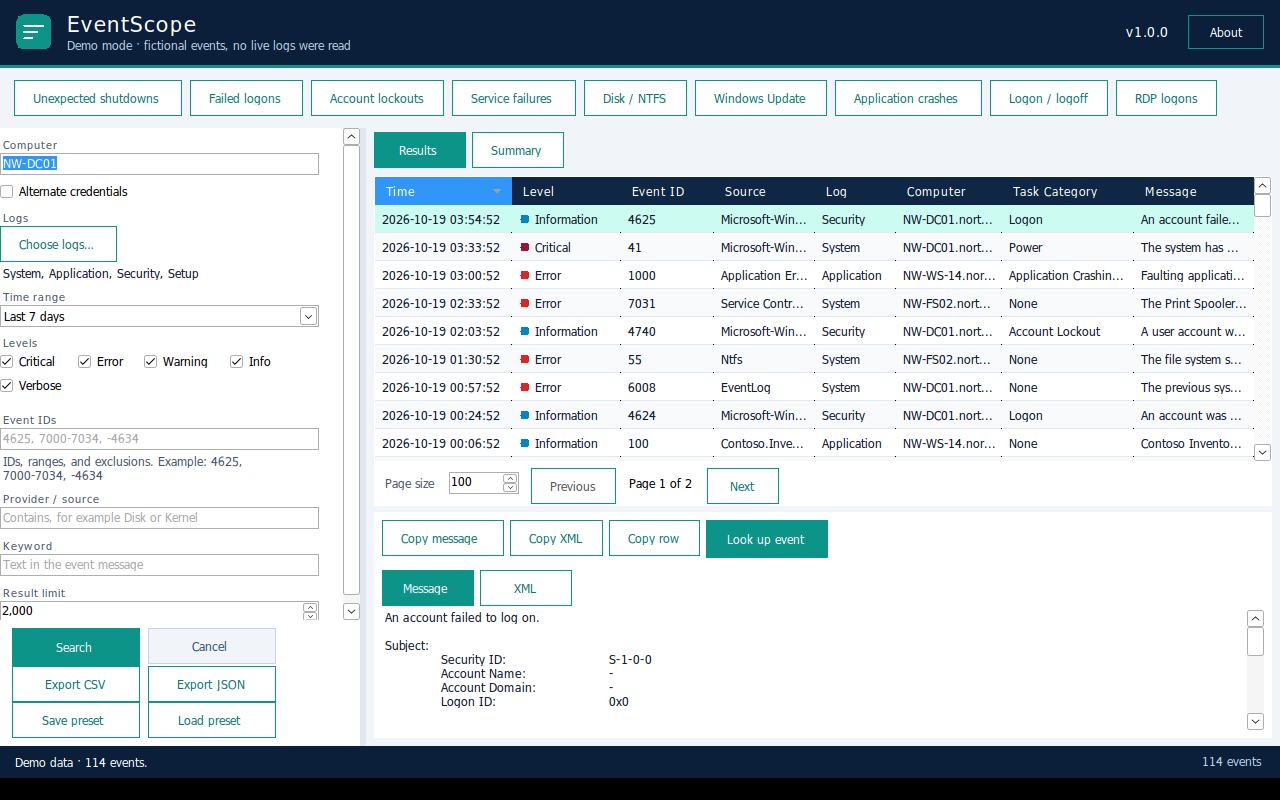
EventScope is a standalone event log search tool for Windows. Point it at this PC or a remote computer, pick the logs (System, Application, Security, Setup, or any other channel), and filter by time range, level, event IDs, source and keyword. The filtering happens in the Windows event log service itself, so searches stay fast even on big logs.
For the usual investigations there are nine one-click quick views: unexpected shutdowns, failed logons, account lockouts, service failures, disk and NTFS errors, Windows Update failures, application crashes, logon/logoff history and RDP logons.
Click an event to see its full message and XML, switch to Summary for charts by level, source and event ID, or look the event up online. Results export to CSV or JSON, and you can save your filters as presets.
It’s one self-contained .exe: no installer, and you don’t need to install .NET.
Built with AI
EventScope was built by a Cursor cloud agent (an AI coding agent that works in the cloud) from a short request.