FolderScope

See which folders are using your disk space.

  • Windows 10/11 (x64)
  • v1.2.2
  • 60.4 MB
  • Released 18 Oct 2026
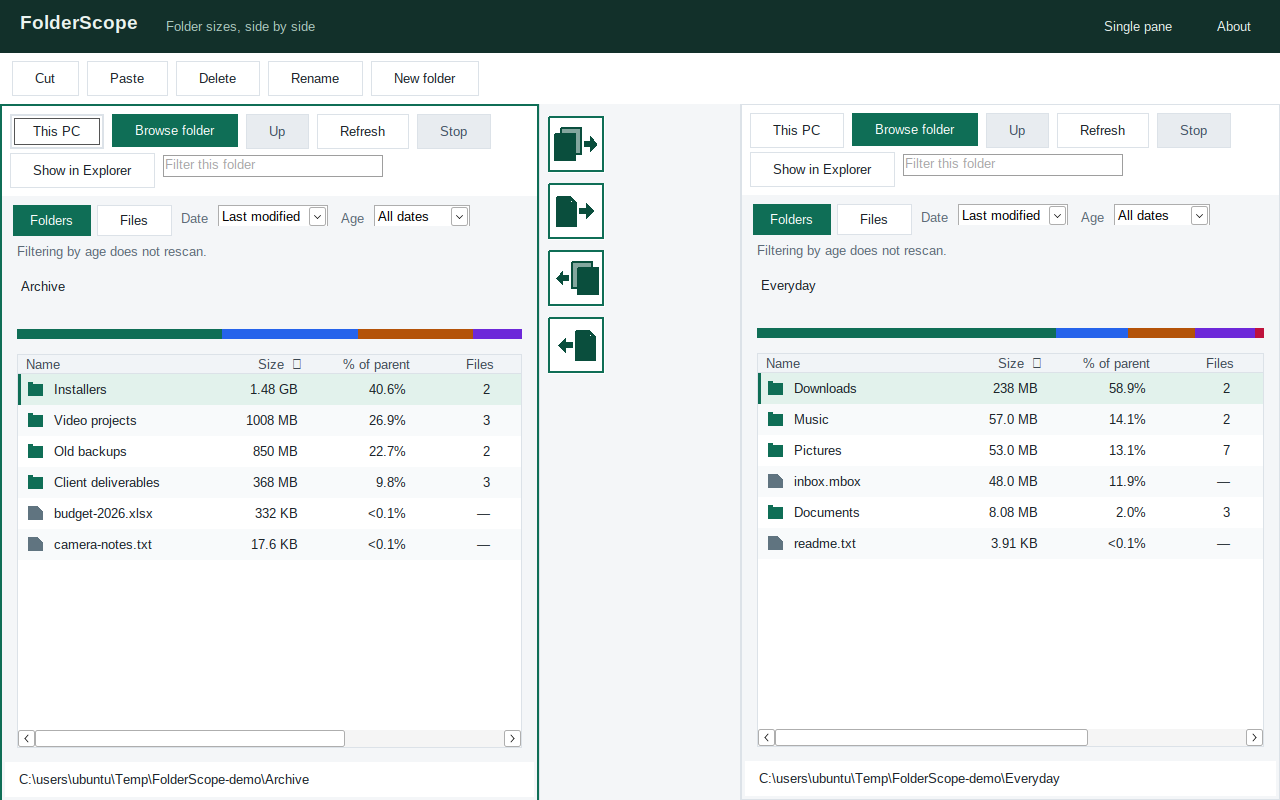
FolderScope 1.2.2 in dual-pane mode: two folder panes side by side, each with Browse folder, date and age filters and a list of folders and files sorted by size with percentage of parent, and a strip of Copy and Move arrow buttons between the panes.
Real screenshot of FolderScope 1.2.2 in dual-pane mode, browsing demo folders. It was captured running under Wine, so the fonts look a little different from Windows.

About FolderScope

FolderScope is a small Windows app that answers one question: where did all my disk space go? Point it at a drive or a folder and it scans in the background, then lists every subfolder by size so the space hogs sit right at the top.

Version 1.1.0 adds date filters, so you can also ask which of that space is old stuff? Pick a preset like “older than 90 days” or “older than 1 year”, or set your own date or range, and choose which date to go by: last modified, created or last accessed. Each folder then shows Match size and Match files next to its full totals, and a new Files view lists the matching files themselves, ready to open, copy or export to CSV. Changing a filter updates the results straight away, with no rescan.

Version 1.2.0 turns it into a dual-pane file manager too. It opens with two panes side by side (you can switch to one), so you can copy, cut, paste, move, delete (to the Recycle Bin), rename and create folders between the panes using the toolbar, right-click menu, keyboard shortcuts or drag-and-drop. Big operations show a progress dialog you can cancel, name clashes let you overwrite, skip or rename, and folder sizes update after each change.

It’s a single self-contained .exe: no installer, nothing to set up, and you don’t need to install .NET. Unzip it, run it, and delete it when you’re done.

Sizes are logical file lengths (the “Size” Explorer shows, not “Size on disk”). FolderScope doesn’t follow junctions or symbolic links, so nothing gets counted twice.

What it does

  • Scans a whole drive or any folder in the background, with progress and a Cancel button
  • Sortable list with size, % of parent, file count and a share bar
  • Date filters with presets: older than 30 or 90 days, 6 months, or 1, 2 or 5 years
  • Custom date filter: before a date, or between two dates
  • Choose the date to filter by: last modified, created or last accessed (Windows often doesn't keep last accessed up to date, so treat it as a rough guide)
  • Match size and Match files totals for each folder, next to the full totals
  • A Modified column in the folder list
  • Files view: lists the matching files, with Open folder, Copy path and Export CSV
  • Dual-pane mode, now the default on first run (switch to a single pane any time)
  • Copy and Move icon buttons in a strip between the two panes, with direction arrows and tooltips
  • Copy, cut, paste, move, delete (to the Recycle Bin), rename and New folder between panes
  • Works from the toolbar, right-click menu, keyboard (Ctrl+C/X/V, F5 copy, F6 move, F2 rename) and drag-and-drop
  • Progress dialog with Cancel, and conflict handling: overwrite, skip or rename
  • Folder sizes update after file changes
  • Toolbars, filters, path and status bars size to fit and wrap in narrow panes, so no control gets cut off; long status messages end in an ellipsis, with the full text in a tooltip
  • Change filters any time without rescanning
  • Drill into a folder, or step back out, to follow the space
  • Filter the list to find a folder fast
  • Refresh to rescan after you clean up
  • Open any folder in File Explorer
  • Run as administrator to include folders your account can't normally read
  • Skips junctions and symlinks, so nothing is counted twice

Built with AI

How it was built

FolderScope was built by a Cursor cloud agent (an AI coding agent that works in the cloud) from a one-line request. From that single line, the agent produced the app, its unit tests, and the self-contained build you can download here. Version 1.1.0 added date filters and the Files view, and the test suite grew from 33 to 41 unit tests. Version 1.2.0 added dual-pane file management and brought it to 51, and 1.2.1 and 1.2.2 polished the layout with all 51 tests passing.

Under the hood

  • .NET 8 with Windows Forms
  • Published as a single self-contained .exe, with no installer
  • Scanning runs in the background, so the window stays responsive and can be cancelled
  • Filters are applied to the scan results already in memory, so changing them doesn't rescan
  • 51 unit tests

Why it's here

It's a good example of what this lab is about: a small, genuinely useful tool, built quickly with AI, and published with enough detail for you to decide whether to trust it.

Changelog

1.2.2 (18 Oct 2026)

  • The folder name, the age filter row and the status line are no longer clipped
  • The age filter hint is now one short line, with the full explanation in a tooltip
  • Long status messages are shortened with an ellipsis, with the full text in a tooltip
  • The progress bar only shows while a scan is running
  • 51 unit tests

1.2.1 (18 Oct 2026)

  • Layout fixes: the Browse folder button and other controls are no longer cut off. Toolbars, filters, path, status bars and dialogs size to their content and wrap in narrow panes
  • Copy and Move are now icon buttons in a strip between the two panes, with direction arrows and tooltips
  • Dual-pane is now the default on first run
  • 51 unit tests

1.2.0 (18 Oct 2026)

  • Dual-pane mode (toggle single/dual pane)
  • Copy, cut, paste, move, delete (to the Recycle Bin), rename and New folder between panes
  • File operations from the toolbar, right-click menu, keyboard (Ctrl+C/X/V, F5 copy, F6 move, F2 rename) and drag-and-drop
  • Progress dialog with Cancel and conflict handling (overwrite, skip or rename)
  • Sizes update after changes
  • 51 unit tests (up from 41)

1.1.0 (18 Oct 2026)

  • Date filters with presets: older than 30 or 90 days, 6 months, or 1, 2 or 5 years
  • Custom date or date range
  • Choose the date field: last modified, created or last accessed (last accessed is often unreliable on Windows)
  • Match size and Match files totals per folder, next to the full totals
  • New Modified column
  • New Files view listing matching files, with Open folder, Copy path and Export CSV
  • Changing filters doesn't need a rescan
  • 41 unit tests (up from 33)

1.0.0 (13 Oct 2026)

  • First release.